Provision Polycom Phones with FreePBX
Change Polycom Addressbook when you change Display Name from Extensions in Elastix : FreePBX
Edit the file /var/www/html/admin/modules/core/functions.inc.php
Add the following lines after line number 4477
1
2
3
4
5
6
$newname=$vars['name'];
//list($fn, $ln) = explode(' ',$newname);
$userparams = core_users_get($extension);
$oldname =$userparams['name'];
if (strcmp($newname, $oldname) !== 0) {
exec("sed -i -- 's/$oldname/$newname/g'    /tftpboot/polycom/contacts/*.xml"); }
Prerequisites
FreePBX TFTP Server Package DHCP Server with Bootserver enabled FTP(vsftpd) for (In new Polycom phones FTP is the default protocol)
Install TFTP Server in PBX
#yum install tftp-server
Change the Owner of TFTP directory to asterisk
#chown asterisk /tftpboot
Edit /etc/xinetd.d/tftp
change the line
disable = no
restart the xinetd service # /etc/init.d/xinetd restart Check if you can access the files from the tftp server.
#echo “test line” > /tftpboot/test.txt
From your client machine run the following command.
C:\> tftp 192.168.20.126 get test.txt Transfer successful: 11 bytes in 1 second, 11 bytes/s
If your TFTP is working you will get the above output.
Install vsftp
If you want to enable FTP provosioning for Polycom phones install vsftpd
#yum install vsftpd
Add Polycom phone user
#useradd PlcmSplp -d /tftpboot #passwd PlcmSplp Enter PlcmSplp as password
Then add PlcmSplp to FTP configuration
#edit /etc/vsftpd/vsftpd.conf Open the vsftpd.conf file and search for chroot_list_enable=YES Uncomment the line and make sure it is YES. Do the same for the following variables chroot_list_file=/etc/vsftpd/chroot_list
Create vsftpd.chroot_list in /etc/vsftpd/ and add the user PlcmSplp.
Save and close the file.
Configure DHCP Server
Configure DHCP sever to send boot sevrver ip along with the DHCP lease. Here I am using windows 2003 server. Find the screen shots
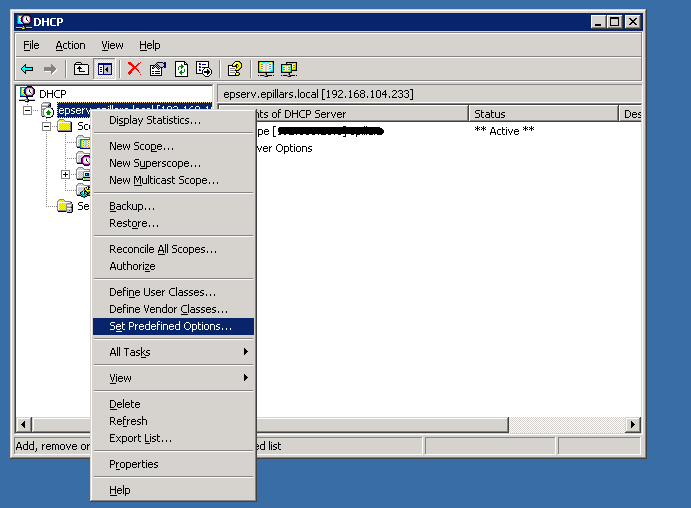
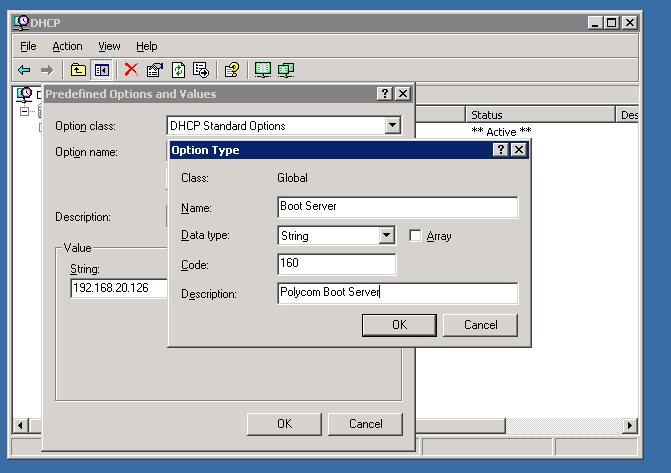
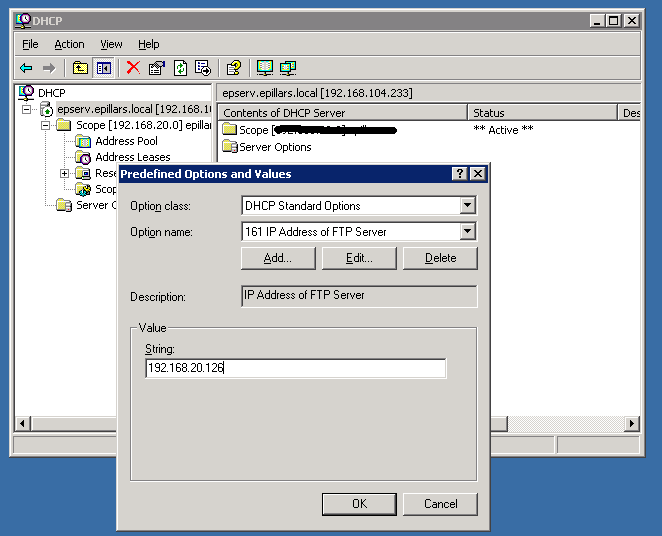
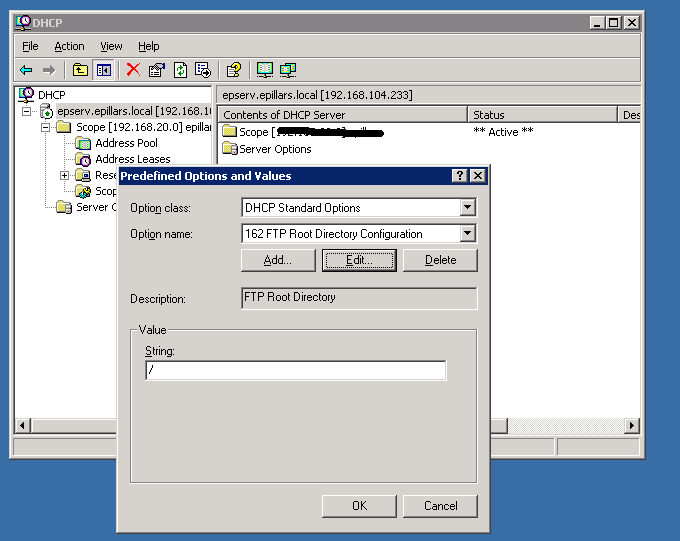
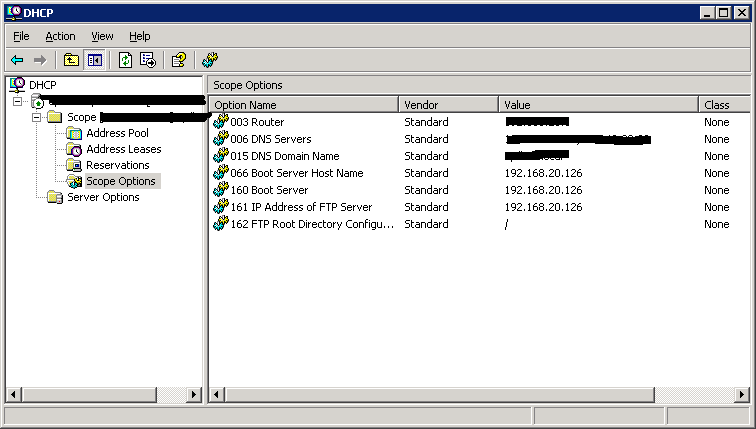
Download and extract the lastest polycom firmware to /tftpboot directory. Download the provisioning module from here and install it into FreePBX from Module Admin Download the sample csv file from here. Add the required extension,fullname,password and macaddress of the phones. Upload the csv file from the Polycom Provsioning Menu of the FreePBX. It will create all polycom configuration files required to register phones. Connect the phones. The phones will be upgraded with the new firmware. Every phones will be provisioned with PBX wide directory(You will get all PBX users extension numbers in directory)
If the phone is not downlading the firmware check the the boot server IP address in the phone. The boot server IP address should be the IP address of the PBX.
1
2
3
4
5
6
7
8
9
10
11
12
13
14
15
16
TFTP Configuration - Write Enabled

/etc/xinetd.d/tftp
service tftp
{
 socket_type = dgram
 protocol = udp
 wait = yes
 user = root
 server = /usr/sbin/in.tftpd
 server_args = -c -s -vv /tftpboot
 disable = no
 per_source = 11
 cps = 100 2
 flags = IPv4
}