Increase size of OracleVM Hard Disk
Normally a 10 GB Hard disk will not take that much space when you create an “dynamically expanding storage” HDD in OracleVM. The size will be the total size of data which you store on that hard disk. So when you create an HDD in OracleVM select “dynamically expanding storage” and put maximum size you may require.
The OracleVM does not have a built in utility to increase the hard disk size. But the following work around helped me to increase the size.
1. Select the OracleVM which has got the low disk space.
2. Select Settings and click on “Storage” and click on the icon “Add Hard disk”
3. Select “Create new disk” and create a hard disk with the required disk space.
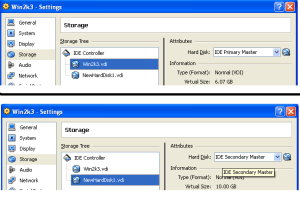
4. Select the newly created hard disk and change the attribute as shown in figure below. If your first hard disk is “IDE Primary Master” then your second hard disk should be ”IDE Secondary Master”.
5. Boot the VM and install any disk cloning tool which works with your OS in VM. I used demo version of Migrate Easy from Acronis which worked just fine for me to clone my Windows 2003 VM HDD. If you does not have enough space to install the software add a new hdd to VM and install the software on that. If you have little space on first hdd change the TEMP settings of existing VM from the “Environment Variables” settings. See the screen shot.
6. After the installation open the disk cloning tool and click trial and then click on “Disk Clone”. Click “Next” and select “Automatic” and click next select the first hard(disk with low disk space ) disk and click next and select the second hdd and continue. It will ask restart the system, restart the VM so that the cloning will start automatically when the VM starts. After cloning the first hdd to new hdd shutdown the VM.
7. Select the VM and click settings. select “Storage” and remove the first hdd. Select the new vdi image and change the Attribute to “IDE Primary Master” which is the attribute of the first hdd you removed.
Boot into to the VM with the new hdd with increased space !